3D Dental Charting Software UK: How It Works in Practice
3D dental charting software in the UK is transforming how dentists manage patient records. These systems replace manual methods with interactive 3D models, making documentation faster, more accurate, and easier to understand for patients. Key features include:
- Real-time charting: Visual representation of teeth, roots, and gums with colour-coded markers for conditions like caries or restorations.
- AI and voice input: Speeds up data entry, allowing hands-free documentation during exams.
- NHS integration: Direct claim submissions from the charting interface, meeting compliance standards.
- Centralised records: Secure cloud storage consolidates notes, X-rays, and billing, ensuring GDPR compliance.
- Improved communication: Visual tools help patients understand treatment plans, boosting acceptance rates.
This technology saves time, reduces errors, and simplifies administrative tasks. It’s particularly useful for periodontal exams and complex cases, ensuring compliance with GDC and CQC standards while enhancing patient care.
Introduction: Why UK Dental Practices Are Moving to 3D Charting
In the UK, traditional dental charting often creates unnecessary administrative burdens, eating into valuable clinical time. Whether it’s handwritten notes or outdated software, these systems are prone to errors and inefficiencies. Even patients are now using AI-powered diagnostic tools to monitor their health from home. For many clinicians, this means spending extra hours after their shifts completing patient records, particularly when documenting detailed procedures like the six-point pocket chart (6PPC). Clearly, there’s a need for a better way to handle this.
The General Dental Council (GDC) emphasises the importance of maintaining “contemporaneous, complete and accurate patient records” [4]. Falling short in this area can lead to patient complaints or issues during CQC audits. However, the process of consistently converting clinical findings into Palmer or FDI notation can be mentally exhausting.
Dr. Stevie, Founder of Dentistry Dashboard, states, “The mental load of constantly translating clinical findings into precise notation is taxing.”
These challenges are driving a shift in the industry. Back in early 2026, cosmetic dentist Dr. Sonila Khanieh shared that switching from manual note-taking to an AI-integrated charting system saved her 90 minutes per day. This change not only reduced the burden of late documentation but also improved the accuracy of patient records [4].
Today, UK dental practices are increasingly turning to 3D dental charting software. The benefits go beyond meeting compliance standards - they also include saving time, minimising errors, and simplifying communication with patients by providing clearer treatment plans. Modern 3D charting systems now come equipped with features like Palmer Notation support, automated periodontal tracking, and visual displays to help patients better understand their treatments, making documentation faster and more efficient.
sbb-itb-d8b42ea
What Is 3D Dental Charting Software and How Does It Work?
@figure {Traditional vs 3D Digital Dental Charting Comparison} :::
3D dental charting software replaces traditional paper records or static 2D charts with an interactive 3D model of a patient’s teeth, roots, and gums. This digital tool allows clinicians to precisely record conditions while offering patients a clear, realistic view of their oral health.
Instead of relying on abstract symbols, 3D charting uses colour-coded markers directly on tooth structures. For example, caries might appear in red, existing restorations in blue, and missing teeth as faded or marked with an “X” [2][4]. This visual approach eliminates the need for technical dental jargon, helping patients easily understand their treatment needs.
Leading platforms like CareStack (rated 4.9/5 by over 1,400 users) and NemoStudio (used by more than 20,000 users worldwide) have become benchmarks for interactive charting [2][5]. These systems integrate clinical tasks with billing, meaning a completed procedure on the 3D chart can instantly generate an invoice and update practice management tools.
Main Features of 3D Dental Charting Software
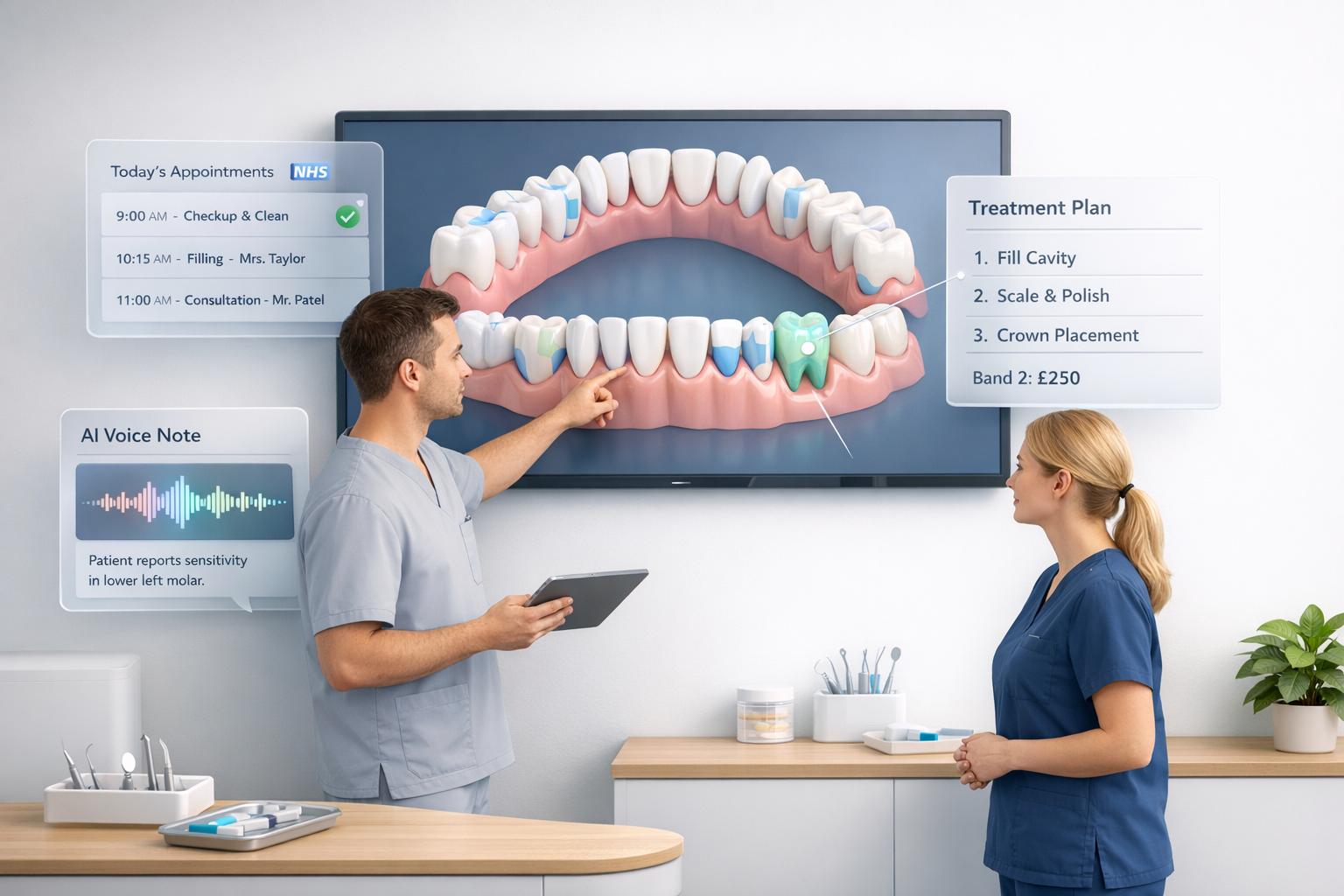
At the core of 3D charting is the interactive odontogram, which provides a detailed history of each tooth. Hovering over a tooth reveals past treatments, current conditions, and future plans. This colour-coded system is particularly helpful during consultations or audits, ensuring precise treatment planning and record-keeping.
AI integration is now a standard feature. Tools like voice-to-text enable hands-free recording during examinations, while AI-powered radiograph analysis can automatically identify issues such as caries.
Specialised views cater to specific patient needs. For children aged 6–12, paediatric charts allow toggling between primary and permanent teeth, making it easier to manage mixed dentition. For gum health, periodontal charting tracks details like pocket depth, mobility, and bleeding over time [1][2].
Many practices in the UK utilise “explosion codes”, which are templates bundling common procedures into one action. For instance, instead of manually entering each step of a routine exam, a pre-set code fills in all relevant fields at once. This reduces administrative tasks, ensures consistency, and improves accuracy [2].
How 3D Dental Charting Works: Step by Step
The process is straightforward and efficient. Start by loading the patient’s record from your cloud-based system. Platforms like Remedico automatically adjust to paediatric charts based on the patient’s age, eliminating the need for manual switching [1][2].
During the examination, clinicians use the 3D model to select specific teeth and mark conditions such as caries, fractures, or restorations. The software supports both Palmer Notation (quadrants 1–8) and the FDI two-digit system, which are standard in UK dental practices [4].
For periodontal cases, you can record BPE scores or complete a six-point pocket chart (6PPC) using voice commands. This hands-free method allows you to focus on the patient while the system records findings in real time [2][4].
Once the charting is done, the software generates a treatment plan based on the conditions marked. This plan can be shared with the patient on-screen, offering a clear breakdown of which teeth need attention and the proposed treatments. The visual clarity often leads to better patient engagement and higher treatment acceptance rates. The completed chart then integrates seamlessly into the practice’s management workflow.
How It Connects with Your Practice Management System
Once clinical findings are documented, the charting system automatically updates your practice management system (PMS), covering billing, scheduling, and compliance records.
This integration eliminates redundant data entry. For example, completing a procedure on the chart updates the patient’s billing record, schedules follow-ups, and logs the work for compliance purposes. Some UK platforms even allow direct NHS claim submissions from the charting interface, saving significant administrative time [3].
For users of Remedico, the 3D charting system works with tools like Smart Calendar for scheduling, Patient Flow™ for tracking patient journeys, and RemedicoGPT™ for generating reports. This ensures clinical notes, billing, and communication stay aligned without extra effort.
Cloud storage ensures records are accessible across multiple branches. If a patient visits another location, their full charting history is available instantly. Automated backups, encrypted storage, and timestamped entries meet GDPR standards and support CQC audits by proving records are accurate and up to date [4].
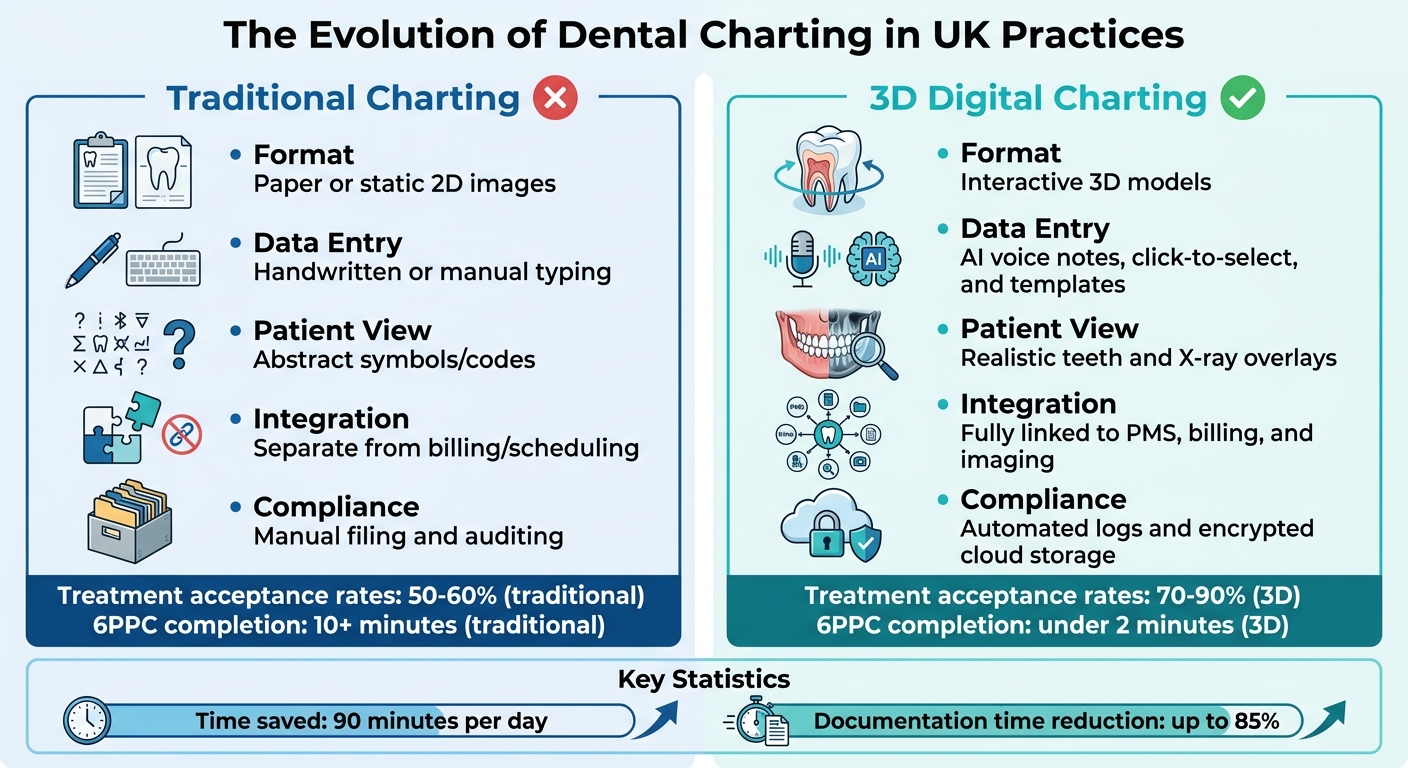
Feature | Traditional Charting | 3D Digital Charting |
|---|---|---|
Format | Paper or static 2D images | Interactive 3D models |
Data Entry | Handwritten or manual typing | AI voice notes, click-to-select, and templates |
Patient View | Abstract symbols/codes | Realistic teeth and X-ray overlays |
Integration | Separate from billing/scheduling | Fully linked to PMS, billing, and imaging |
Compliance | Manual filing and auditing | Automated logs and encrypted cloud storage |
Benefits of 3D Dental Charting Software for UK Practices
Better Patient Understanding and Treatment Acceptance
When patients see a realistic 3D model of their oral health instead of abstract symbols, it becomes much easier for them to grasp the situation. This visual clarity can boost treatment acceptance rates by as much as 40%. Many clinics using 3D charting report acceptance levels of 70–90%, far surpassing the typical industry average of 50–60%.
Dr. Heather Frodge, a dentist who actively uses 3D charting, shares her experience:
“For patients, treatment planning has been wonderful. They can see exactly what we need to do. It has increased treatment plan acceptance.”
The software also simplifies periodontal care by visually presenting gum health metrics like pocket depths and bleeding points through automated BPE and 6PPC charting. This makes it easier for dentists to explain treatment plans, which is crucial since research shows that 59% of patients are more likely to accept treatments supported by AI-driven diagnostics.
Beyond improving patient understanding, these tools enhance record-keeping and compliance processes, making them an asset for both patients and practitioners.
Faster Documentation and CQC Compliance
The General Dental Council (GDC) requires dentists to maintain “contemporaneous, complete and accurate patient records” [4]. This is especially important during CQC audits, where the quality of clinical records is closely examined [4]. AI-powered tools like AI Dental Notes can help meet these standards while saving significant time. For example, Dr. Sonila Khanieh, a cosmetic dentist, reduced her daily record-keeping time by 90 minutes after adopting these tools. She noted that she could now complete documentation during work hours instead of taking it home [4].
The software automatically generates GDC-compliant notes from natural speech, eliminating the need to manually translate findings into Palmer or FDI notation [4]. This ensures records are accurate and up to date, providing clear evidence of compliance during audits.
In addition to improving compliance, these tools dramatically reduce the time spent on documentation.
Time Saved Through AI and Voice Input
Voice-activated charting can complete a full 6-point pocket chart (6PPC) in under two minutes, compared to the 10 minutes or more it usually takes to do this manually [8]. By combining AI voice technology with automation, practices can cut documentation time by up to 85% [6][7].
Amanda Bell, Business Manager at Bell Family Dentistry, highlights the benefits:
“Our hygienists can let Voice do more of the work, so they focus on our patients’ needs and questions.” [10]
These systems transcribe patient conversations in real time, turning them into structured clinical notes [7][10]. Designed to recognise UK accents and operate on GDPR-compliant UK/EU servers, the software ensures both accuracy and data security [8]. Voice commands like “pause” and “resume” allow clinicians to manage interruptions without breaking sterile conditions during exams [7].
For UK practices handling BPE screenings and periodontal exams, this technology saves one to two hours daily on charting and note-taking [7]. It also ensures standardised data capture across all exams, offering reliable longitudinal data for CQC audits and better clinical oversight [9].
Real Example: How a UK Dental Practice Uses 3D Charting Software
Charting a New Patient Examination
When a new patient visits a UK dental practice equipped with 3D charting software, the dentist begins by creating a precise digital map of the patient’s mouth. This map documents restorations, materials, and missing teeth, all recorded using the Palmer Notation system.
During the examination, the dentist can use voice commands to dictate findings like, “Upper Right Six, MOD composite.” These commands are instantly transcribed into structured clinical notes, making documentation faster and easier [4]. For periodontal screening, the practice typically carries out a Basic Periodontal Examination (BPE). If the results include scores of 3 or 4, they transition to a more detailed Six-Point Pocket Chart (6PPC), again using hands-free voice commands to record critical data like pocket depth and bleeding points [4].
The software’s visual tools also aid in patient communication. It uses colour coding to differentiate “Planned” and “Completed” treatments, which simplifies explaining the next steps in care. Additionally, treatment plans can be directly linked to the practice’s scheduling system, turning proposed care into confirmed appointments without adding any extra administrative burden.
Beyond routine exams, this system proves invaluable for more complex cases and regulatory processes.
Handling Periodontal Cases and CQC Audits
While it’s efficient for routine work, the software truly shines in managing complex cases and ensuring compliance with regulatory audits. For practices with multiple locations or specialists, cloud-based functionality enables seamless collaboration. Adrian Watts, a Specialist in Restorative Dentistry and Implant Surgeon at Bristol Dental Specialists, highlights this advantage:
“Our clinicians all work in several different locations, so we wanted a system where we could collaborate on patient care remotely.” [12]
When preparing for a CQC audit, the software’s export tools ensure that clinical records meet the required standards of being “contemporaneous, complete and accurate”, satisfying both GDC and CQC expectations [4]. Furthermore, completed periodontal treatments are automatically invoiced, reducing the need for manual input and minimising errors during inspections [11][12]. These practical features help dental practices operate more efficiently while staying compliant with regulatory requirements.
Key Takeaways: What to Know Before Choosing 3D Dental Charting Software
When selecting 3D dental charting software, ensure it supports Palmer Notation (the four-quadrant, 1–8 numbering system), FDI, Basic Periodontal Examination (BPE), and detailed Six-Point Pocket Charting (6PPC). These features are crucial for meeting UK practice standards [4].
It’s also important to confirm that the software generates GDC/CQC-compliant records. These records should be “contemporaneous, complete and accurate” to protect your practice and simplify audits [4]. For practices treating children, check that the system allows for mixed dentition charts, enabling easy switching between primary and permanent teeth representations [1].
Integration is another key factor. Request a list of compatible practice management systems and imaging hardware to ensure seamless operation. For instance, practices using API-connected platforms like CareStack have made over 27,000,000 API calls to unify data across multiple locations [13]. If you’re managing several sites or working with specialists, cloud-based access and built-in integrations can save considerable time.
You should also consider the upfront costs and the time required for staff to adjust to the new system [14]. That said, practices using visual treatment planning tools often experience treatment acceptance rates of 70% to 90%, compared to the industry average of 50% to 60%. Additionally, features like automated reminders and digital consent forms can save over 40 hours of administrative work each month [2].
Lastly, look for software with voice-to-text documentation and AI-assisted charting. As Amanda Bell, Business Manager & Owner at Bell Family Dentistry, explains:
“Our hygienists can let Voice do more of the work, so they focus on our patients’ needs and questions.”
This not only saves time but also enhances patient care and outcomes.
FAQs
How much does 3D dental charting software cost in the UK?
The price for 3D dental charting software in the UK generally falls between £78 and £80 per dentist each month. However, some providers might offer tailored or enterprise-level pricing based on the specific requirements and features desired. :::
Will it work with my existing X-ray sensors and practice management system?
Yes, most modern dental software in the UK that includes 3D dental charting is built to work smoothly with existing X-ray sensors and practice management systems. If your current systems support open standards or have flexible, customisable interfaces, integration is typically straightforward. :::
How long does staff training and set-up take?
Staff training and configuring 3D dental charting software in the UK generally takes anywhere from a few days to a week. The timeframe can vary depending on how complex the software is and how the practice’s current systems are set up. Training sessions, which typically last 1–3 days, focus on key features like treatment planning and voice-to-text functionality. Meanwhile, the setup process, including integration with existing systems and any necessary customisation, is designed to ensure everything runs smoothly within the week. :::